Everything I own, owned
August 23, 2026
2026年8月23日
Over the past couple weeks I’ve been doing agent-driven reverse engineering of peripherals that happen to be within arm’s reach. From those devices, I’ve come away with a full plaintext command shell inside my microphone, a webcam whose activity LED I can switch off while it records, and a key light that hands out memory writes to anyone on the WiFi. Peripherals have proven to be an ideal target for agentic RE - they’re tiny computers attached to my computer, with a data connection to the host and usually a firmware update mechanism, so an agent has something to iterate against. The net outcome is better control and understanding of my machine.
过去几周,我一直在对触手可及的外设进行代理驱动的逆向工程。从这些设备中,我获得了一个位于我麦克风内部的完整明文命令shell、一个可以在录制时关闭活动指示灯的网络摄像头,以及一个允许WiFi网络上的任何人进行内存写入的补光灯。外设已被证明是代理式逆向工程的理想目标——它们是连接到我的电脑上的微型计算机,具有与主机的数据连接,通常还具备固件更新机制,因此代理有可以反复迭代的东西。最终的结果是对我的机器有了更好的控制和理解。
My process was pretty much the same for each of these devices: grab a copy of the device’s firmware and associated update tool from the manufacturer, throw it into my reverse engineering environment, tell Claude Opus 5 what my goals are, and let it churn. Depending on the device, the goals were somewhat different, but they usually looked something like:
我对每个设备的处理流程基本相同:从制造商那里获取设备固件和关联的更新工具,将其丢进我的逆向工程环境,告诉 Claude Opus 5 我的目标,然后让它自行运转。根据设备的不同,目标也有所不同,但通常类似于以下内容:
In this directory is the firmware and update utility for ___. The device is also attached to this computer, and you may interact with it in non-mutating ways. Exhaustively document and cross-validate the entire firmware, including the following goals:

* reverse engineer the firmware update format and update protocol
* implement our own update utility
* determine the security properties of the update protocol, including checksums, signature validation, secure boot
* use static and dynamic analysis to determine all protocol surfaces and completely enumerate functionality
* find any hidden or debug functionality in the product and how to access it
In this directory is the firmware and update utility for ___. The device is also attached to this computer, and you may interact with it in non-mutating ways. Exhaustively document and cross-validate the entire firmware, including the following goals:

* reverse engineer the firmware update format and update protocol
* implement our own update utility
* determine the security properties of the update protocol, including checksums, signature validation, secure boot
* use static and dynamic analysis to determine all protocol surfaces and completely enumerate functionality
* find any hidden or debug functionality in the product and how to access it
Depending on the results, there were different directions of follow-up, but you should get the general idea. Let’s run through the list - each device links to a GitHub repo full of generated-slop docs and scripts, most of which have been validated live against real hardware. I’ve also included the effort each device took, pulled out of the Claude Code session transcripts. “Churn” is the time Claude was actually working, with the long idle gaps removed. “Prompts from me” is every message I typed, including the one-word ones telling it to keep going. All five devices together came out to about 13 hours of churn and 98 prompts, spread across two weeks of evenings.
根据结果的不同,后续跟进的方向也不同,但你应该能大致了解。让我们过一遍这个列表——每个设备都链接到一个GitHub仓库,里面充满了生成的粗糙文档和脚本,其中大部分已经在真实硬件上进行了实时验证。我还列出了每个设备所花费的精力,这些数据提取自 Claude Code 的会话记录。「运转时间」是指 Claude 实际工作的时间,已剔除了较长的空闲间隔。「我的提示」是我输入的每条消息,包括那些只说一个词让它继续的消息。所有五个设备加起来总共大约13小时的运转时间和98条提示,分布在两周的晚间。
Everything I own
我拥有的一切
Insta360 Link webcam
Insta360 Link 网络摄像头
GitHub repo - 3.7 hours of Claude churn, 33 prompts from me
GitHub 仓库 - Claude 运转 3.7 小时,我发了 33 条提示
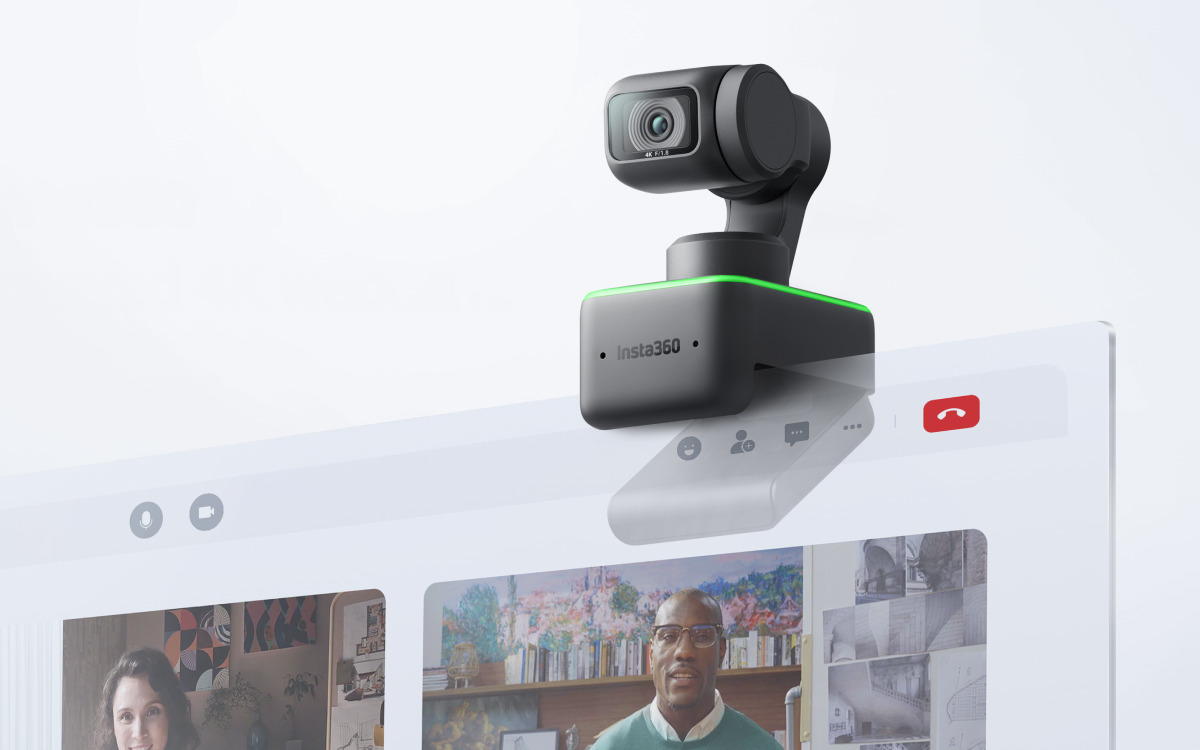
I use an Insta360 Link webcam, which is a nice gimbaled pan-tilt-zoom camera that does face tracking for automatically framing the shot. I wanted to know if it was possible to subvert the activity LED, like in the classic iSeeYou exploit.
我使用的是 Insta360 Link 网络摄像头,这是一款不错的带云台的平移-倾斜-变焦摄像头,具备人脸追踪功能,可以自动构图。我想知道是否有可能像经典的 iSeeYou 漏洞利用那样,篡改活动指示灯。
Interestingly, it was immediately obvious that this camera has a lot going on inside it. It turns out that it runs a whole RTOS (ThreadX) sourced from the upstream SoC vendor, Ambarella. The RTOS hosts several small vision models that provide things like the aforementioned face tracking, as well as gesture detection for controlling settings. Pretty amazing complexity inside a tiny webcam, but it also means there’s some exciting attack surface here.
有趣的是,这台摄像头的内部大有乾坤,这一点非常明显。事实证明,它运行着来自上游 SoC 供应商 Ambarella 的一个完整的 RTOS(ThreadX)。该 RTOS 托管了几个小型视觉模型,提供诸如前面提到的人脸追踪,以及用于控制设置的手势检测等功能。在微小的网络摄像头内部拥有如此惊人的复杂性,但这同时也意味着这里存在一些令人兴奋的攻击面。
Over the USB Video Class interface, there’s an XU (Extension Unit) command that kicks the device into “mass storage” mode. This then lets us transfer a staged firmware update to the device’s internal FAT filesystem, which the device then applies to itself on reboot. This route does require user intervention to reboot with a replug, but there’s actually another command channel that exposes arbitrary read/write of files and a reboot command over the USB vendor class. With this, we can fully flash the device without any user interaction. Once the firmware is in the right place, there’s effectively no anti-tamper, just an appended MD5 hash to ensure integrity.
在 USB Video Class 接口上,有一个 XU(Extension Unit)命令可以将设备切换到“大容量存储”模式。这样我们就可以将暂存的固件更新传输到设备的内部 FAT 文件系统中,设备在重启时会自行应用该更新。这种方式确实需要用户干预,通过重新插拔来重启,但实际上还有另一个命令通道,通过 USB vendor 类暴露了任意文件读写和重启命令。有了它,我们就可以在没有任何用户交互的情况下完全刷写设备。一旦固件放对了位置,实际上没有任何防篡改机制,只有一个附加的 MD5 哈希来确保完整性。
The indicator LED turns out to have a well-structured set of “patterns” in the firmware that dictate color, blink pattern, etc. that are indexed into for various device states. I had Claude write a tool to patch out the table entry for camera activity, fix up the integrity hash, and flash it to the camera. A quick test showed that the green LED that normally illuminates while recording no longer turned on. Horrifying! On this device, the gimbal itself also deflects down when not recording, so it’s not completely stealth, but it still doesn’t feel great.
原来指示灯在固件中有一套结构良好的“模式”集,用于规定颜色、闪烁模式等,并通过索引对应各种设备状态。我让 Claude 写了一个工具来修补掉相机活动对应的表项,修复完整性哈希,并将其刷入相机。快速测试表明,录制时通常会亮起的绿色 LED 不再亮了。令人毛骨悚然!在这款设备上,云台在不录制时本身也会向下偏转,所以它并非完全隐蔽,但感觉依然很糟糕。
The LED behavior before and after patching.
修补前后的 LED 行为。
ASUS ROG Swift PG42UQ monitor
ASUS ROG Swift PG42UQ 显示器
GitHub repo - 1.2 hours of Claude churn, 13 prompts from me
GitHub repo - Claude 运行了 1.2 小时,我发了 13 条提示

My ASUS ROG Swift PG42UQ monitor was actually where I started, because I got annoyed at the pop-up overlay that comes up every once in a while that tells me to run “pixel cleaning”. I have never intentionally run pixel cleaning on this monitor and I never will, I don’t care, and I would like for that overlay to go away forever. Maybe there’s a debug menu or something that can turn it off, or worst case we patch a branch in the firmware?
我的 ASUS ROG Swift PG42UQ 显示器实际上是我开始的地方,因为我经常被时不时弹出的提示我运行“像素清洁”的覆盖层所困扰。我从未在这个显示器上有意运行过像素清洁,以后也永远不会,我不在乎,我希望那个覆盖层永远消失。也许有个调试菜单或什么东西可以把它关掉,或者最坏的情况下,我们修补固件中的某个分支?
Claude found that the firmware has effectively no protection whatsoever - there’s a two-slot A/B scheme and a simple checksum, but ultimately we can write whatever we want to the thing. Firmware updates run over an I2C bus bridged over USB.
Claude 发现该固件实际上没有任何保护措施——它有一个双槽 A/B 方案和一个简单的校验和,但归根结底我们可以向它写入任何我们想要的内容。固件更新通过桥接到 USB 的 I2C 总线进行。
The pixel cleaning warning turns out to have no native way to disable it, and it’ll always show up after 8 hours of runtime. Oh well. Claude did find the appropriate area to patch to kill the functionality though. I haven’t actually been brave enough to write a modified firmware to the thing yet - it’s a pretty expensive monitor - but I’ll get there at some point.
事实证明,像素清洁警告没有原生的禁用方法,而且在运行 8 小时后它总是会显示出来。算了。不过 Claude 确实找到了合适的补丁位置来禁用该功能。我目前还没有足够的勇气将修改后的固件写入到设备中——这是一台相当昂贵的显示器——但总有一天我会这么做的。
Another neat thing was exploring the DDC/CI interface. This is the control channel available over the display cable itself, allowing the host to change inputs and other settings. I believe ASUS offers this through their Windows utility, DisplayWidget, but that does little for me on Linux. So, now I have a shell script that can flip through some of the DDC/CI features like the hardware crosshair or zoom overlays, FPS counter, and countdown timer. I might set up some of these on hotkeys in the future for easy access.
另一件有趣的事是探索 DDC/CI 接口。这是通过显示线缆本身提供的控制通道,允许主机更改输入源和其他设置。我相信 ASUS 通过其 Windows 实用程序 DisplayWidget 提供了此功能,但这对我使用 Linux 没什么用。因此,现在我有了一个 shell 脚本,可以切换一些 DDC/CI 功能,如硬件准星或缩放叠加层、FPS 计数器和倒计时器。将来我可能会把这些设置绑定到热键上,以便于访问。
Shure MV7 microphone
Shure MV7 麦克风
GitHub repo - 4.2 hours of Claude churn, 32 prompts from me
GitHub 仓库 - Claude 4.2 小时的折腾,我发送了 32 个提示

At this point, there’s less actual incentive to keep popping these devices and more just morbid curiosity. My microphone, the Shure MV7, connects over USB and obviously has some amount of smarts to it, with on-device digital volume controls and such.
到了这一步,继续拆解这些设备的实际动力已经不大了,更多是出于一种病态的好奇心。我的麦克风,Shure MV7,通过 USB 连接,显然它具备一定的智能功能,比如设备上的数字音量控制等。
The firmware for this one turned out to be hidden inside the Windows software, MOTIV Mix, so Claude installed that in Wine, found the update server, and pulled it down. I wasn’t on the latest, so there was actually a reasonable incentive here to get this working just to update my microphone from Linux. The firmware turned out to contain both DSP and MCU firmware, and was honestly pretty boring as you might expect. Again, no real security on the firmware flash itself.
事实证明,这个固件隐藏在 Windows 软件 MOTIV Mix 中,因此 Claude 在 Wine 中安装了该软件,找到了更新服务器,并将其下载下来。我用的不是最新版本,所以在这里确实有合理的动力去搞定这件事,只是为了能从 Linux 上更新我的麦克风。固件结果显示它同时包含 DSP 和 MCU 固件,而且正如你所料,确实相当无聊。同样,固件闪存本身没有任何真正的安全保护。
However, the update protocol revealed that the entire thing actually runs over a USB HID vendor class protocol that implements a full plaintext command shell, with 48 different commands. Since it’s HID, we can actually hit this over WebHID from a webpage in Chrome, so I had Claude build a web interface for using the shell. There’s all sorts of interesting settings in here including a dozen DSP knobs, arbitrary memory read/write, LED control, and a 4-tier user privilege system whose entire authentication is a string comparison against the name of the tier you asked for. su sup just works, and the top tier can disable the touch panel so you can’t mute at the device, and drive the mute LED independently of whether the microphone is actually muted. It’s the webcam LED trick again, on a microphone. Obviously, be aware that you could probably break your device if you use that UI and do something stupid with it.
然而,更新协议揭示了整个设备实际上运行在一个 USB HID 厂商类协议上,该协议实现了一个_完整的明文命令 shell_,包含 48 条不同的命令。因为是 HID,我们实际上可以通过 WebHID 从 Chrome 中的网页与它通信,所以我让 Claude 构建了一个用于操作该 shell 的网页界面。这里有各种有趣的设置,包括十几个 DSP 旋钮、任意内存读写、LED 控制,以及一个 4 级用户权限系统——其全部身份验证仅仅是与你请求的权限级别名称做一次字符串比较。su sup 直接就能用,而且最高权限级别可以禁用触摸面板,让你无法在设备上静音,并独立于麦克风是否真正静音来驱动静音 LED。这又是那个网络摄像头 LED 的把戏,只不过这次用在了麦克风上。显然,请注意,如果你使用了那个界面并做了愚蠢的操作,你很可能会弄坏你的设备。
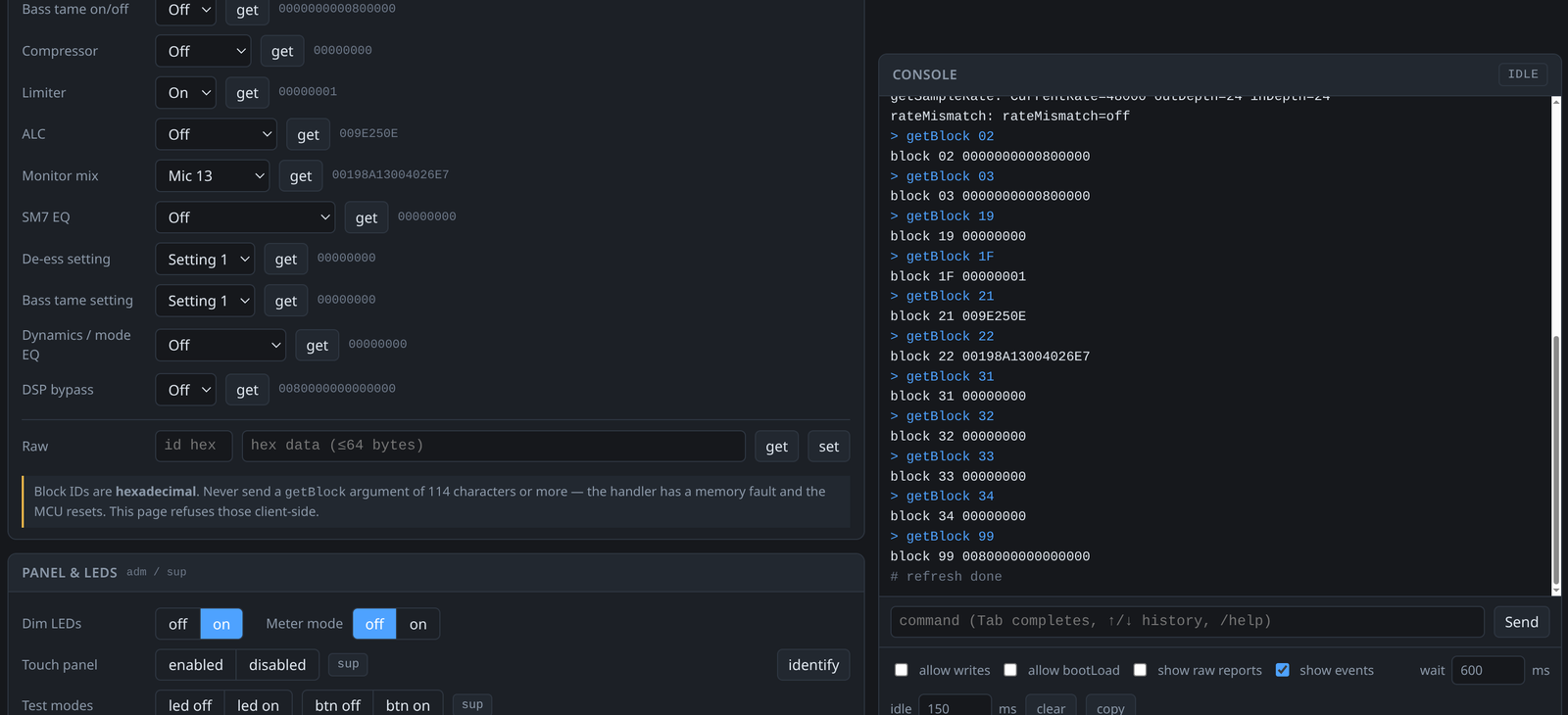 The WebHID shell interface. The DSP knobs on the left are the device’s own settings; the console on the right is the plaintext command shell talking over HID.
WebHID shell 界面。左侧的 DSP 旋钮是设备自身的设置;右侧的控制台是通过 HID 进行通信的明文命令 shell。
Elgato Cam Link 4K video capture
Elgato Cam Link 4K 视频采集
GitHub repo - 1.5 hours of Claude churn, 10 prompts from me
GitHub 仓库 - Claude 运行了 1.5 小时,我提了 10 次提示
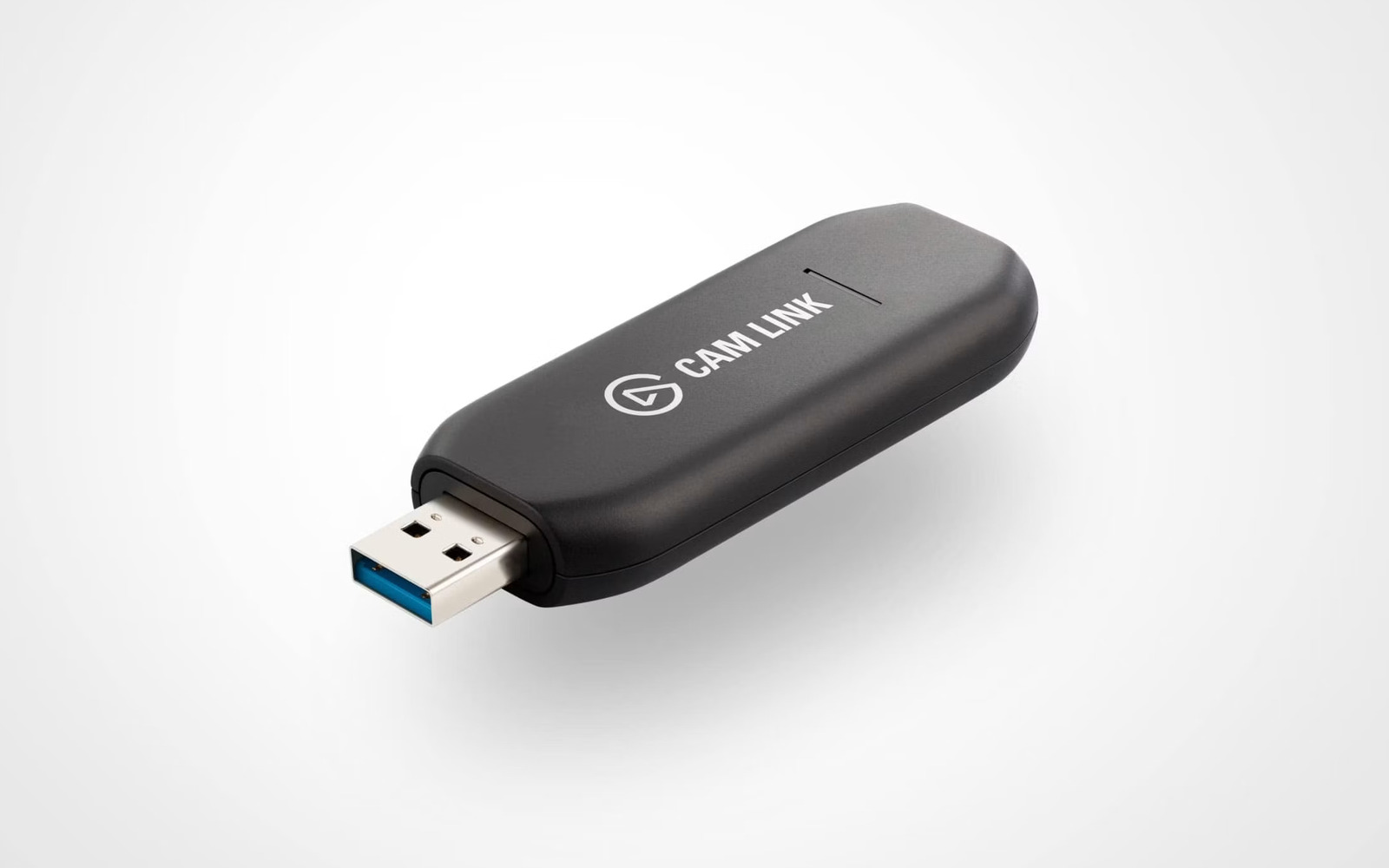
The Elgato Cam Link 4K is just an HDMI video capture device, and honestly was just more of the same. The interesting thing for this one was that I let it go fully unattended - I literally kicked off the process before going to sleep and woke up to a teardown and functioning firmware updater. The firmware contains an MCU image and an FPGA bitstream for the actual HDMI handling, so you could potentially do something fun with the FPGA if you went deep enough into the reverse engineering there. There’s no protection on the firmware update path.
Elgato Cam Link 4K 只是一个 HDMI 视频采集设备,说实话,还是那些老套路。这次有趣的地方在于,我让它完全无人值守地运行——我真的是在睡觉前启动了这个流程,醒来时就已经得到了拆解报告和可用的固件更新器。固件包含一个 MCU 镜像和一个用于实际 HDMI 处理的 FPGA 比特流,所以如果你在逆向工程方面挖得足够深,你或许可以用 FPGA 做些有趣的事情。固件更新路径没有任何保护。
I was able to pull out all the EDID information used for negotiating video parameters, so we know exactly what resolutions, refresh rates, color spaces, and chroma subsampling options are offered to devices.
我成功提取出了所有用于协商视频参数的 EDID 信息,因此我们确切知道向设备提供了哪些分辨率、刷新率、色彩空间和色度抽样选项。
The vendor HID protocol does include tunneled access to the internal I2C bus, which is kinda neat as you can poke the internal HDMI receiver registers.
厂商的 HID 协议确实包含对 内部 I2C 总线 的隧道访问,这挺酷的,因为你可以直接探查内部 HDMI 接收器的寄存器。
Elgato Key Light Mini
Elgato Key Light Mini
GitHub repo - 2.4 hours of Claude churn, 10 prompts from me
GitHub 仓库 - 2.4 小时的 Claude 轮次,来自我的 10 个提示
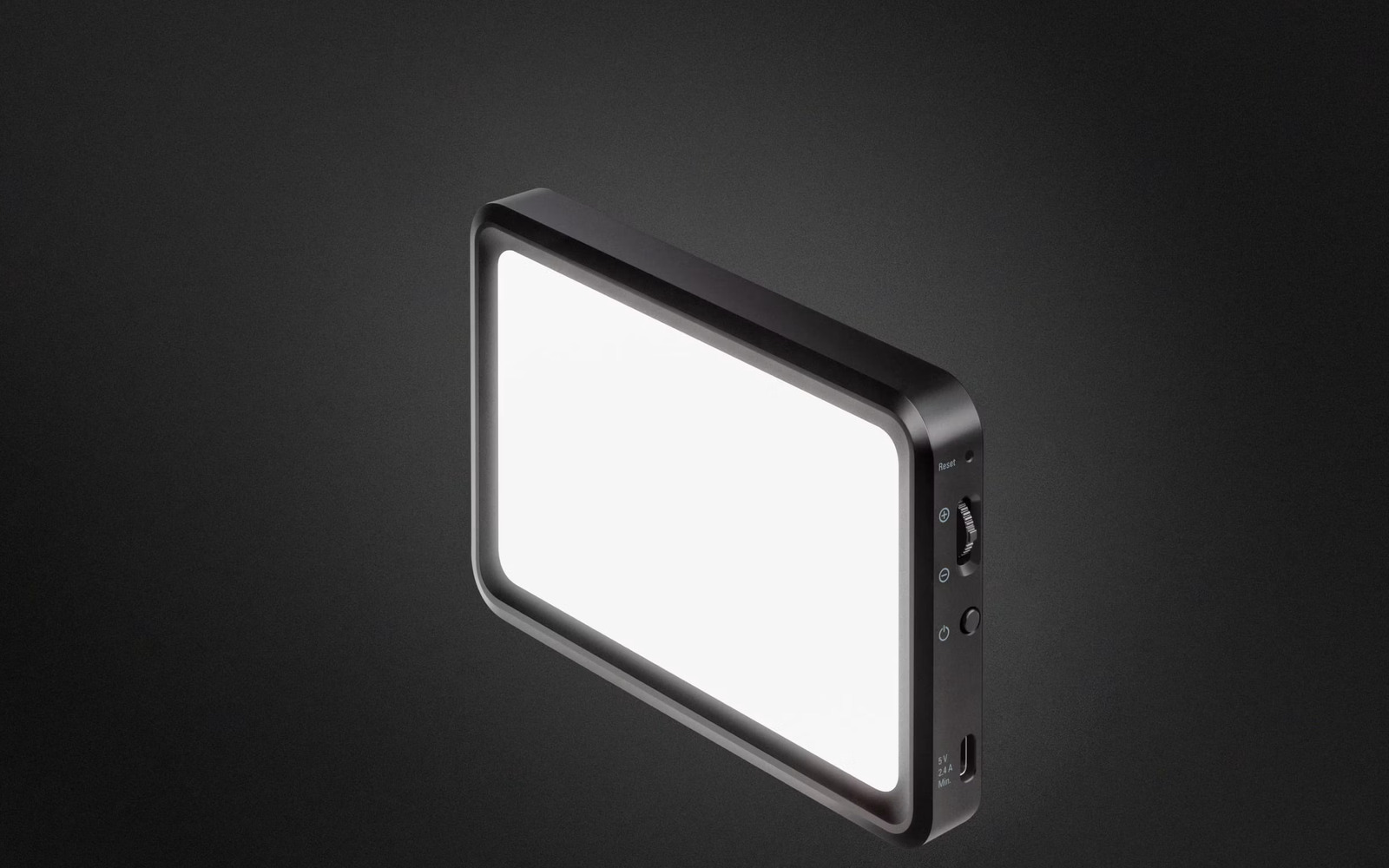
Finally, I poked at something that wasn’t connected over USB but WiFi instead, the Elgato Key Light Mini. This one turned out to be way more interesting than I expected: it’s the only one with meaningful firmware integrity protection. Elgato signs the firmware updates with Ed25519 over a SHA-512 hash of the firmware payload, and rejects firmware that doesn’t validate. This makes sense to do, as the device basically connects to a WiFi network and then provides unauthenticated access to anyone on the same network, so the threat model is inherently different.
最后,我研究了一个不是通过 USB 连接,而是通过 WiFi 连接的设备,即 Elgato Key Light Mini。这个设备比我预期的要有趣得多:它是唯一一个具有实质性固件完整性保护的设备。Elgato 使用 Ed25519 对固件负载的 SHA-512 哈希值对固件更新进行签名,并拒绝未通过验证的固件。这样做是有道理的,因为该设备基本上连接到 WiFi 网络,然后向同一网络上的任何人提供未经身份验证的访问权限,因此威胁模型本身就不同。
Unfortunately, while that’s an improvement over all of the other devices we’ve looked at, it protects the firmware at exactly one point in time: when an update is happening. It’s not a boot time check enforced by the bootloader or any other kind of secure boot scheme, and the updater happens to be running while everything else in the device is still operating, meaning there’s huge attack surface to try to disable that signature validation. I asked Claude to look for an exploit that might enable this, and it found a doozy: an HTTP POST request that drops a payload straight into the internal UART, which includes a memory poke command. This means that a single HTTP POST of ATSE=0200ED94,0E001009 turns the signature check into a no-op, and we can freely update to a firmware image without a legitimate signature. I successfully tested this with a simple patch that changed the name of the device, so uh, yeah, don’t put these on an untrusted network.
遗憾的是,虽然这比我们看过的所有其他设备都要好,但它只在一个时间点保护固件:更新发生时。这不是由bootloader强制的启动时检查,也不是任何其他类型的安全启动方案,而且更新器运行时设备中_其他所有部分_仍在运行,这意味着有巨大的攻击面可以尝试禁用签名验证。我让Claude寻找可能实现这一点的漏洞利用,它找到了一个绝妙的发现:一个HTTP POST请求,该请求将载荷直接发送到内部UART,其中包含一个内存写入命令。这意味着单个ATSE=0200ED94,0E001009的HTTP POST就能让签名检查变成空操作,我们可以自由地更新到没有合法签名的固件镜像。我用一个修改设备名称的简单补丁成功测试了这一点,所以,嗯,没错,不要把这些设备放在不受信任的网络上。
…, owned
……,被攻陷
I have a lot of feelings about this whole thing. As I wrote back in March, this is incredible for interoperability and fixing things that don’t work how we want them to. Hardware is almost universally “open” for tinkering at this point with just a couple hours of mostly hands-off machine-driven labor each, and I look forward to a near future where I can add features to my webcam firmware as easily as I can to software that runs on my Linux machine itself.
我对这整件事有很多感想。正如我三月份所写的,这对互操作性和修复那些不符合我们期望的功能来说是_不可思议的_。硬件现在几乎普遍可以"开放"地进行改造,每个设备只需几个小时,大部分是无需人工干预的机器驱动工作,我期待着不久的将来,我能像在Linux机器上为软件添加功能一样轻松地为我的网络摄像头固件添加功能。
On the other hand, as a security professional, this scares me for several reasons. I would work from the operating assumption that any device attached to a computer could have had a malicious firmware implant performed, where previously that required significant per-model investment and was stereotyped as a “state actor” kind of activity. Operating systems aren’t really equipped to work with the user to ensure that a microphone stays a microphone, and doesn’t spontaneously turn into a keyboard that hits Win+R and drops a payload to steal all your data when the room is quiet enough that it can assume you aren’t watching. And the existence of WebUSB, WebHID, and WebBluetooth mean that for some devices, depending on the specifics of which classes are used, a moment of user indiscretion in accepting a permissions prompt could permanently backdoor one of their attached devices.
另一方面,作为一名安全专业人士,这出于几个原因让我感到恐惧。我会在这样的操作假设下工作:任何连接到计算机的设备都可能被植入了恶意固件,而在以前,这需要针对每个型号进行大量投入,并且被刻板地认为是一种“国家级行为者”的活动。操作系统并没有真正配备与用户协作的功能,以确保麦克风始终是麦克风,不会自发地变成一个键盘,按下 Win+R 并投放有效载荷,在房间足够安静以至于它可以认为你没在看的时候窃取你的所有数据。而且 WebUSB、WebHID 和 WebBluetooth 的存在意味着,对于某些设备来说,根据所使用的具体类别的不同,用户在接受权限提示时的一时疏忽就可能永久性地在其连接的某个设备上植入后门。
Network-connected devices seem near universally fucked at this point? There are a few others I’ve poked at that I haven’t documented here, but I’ve gotten a root shell on a commercial Dell display, and RCE on an Eaton UPS. Obviously it was never best practice to let untrusted clients touch these things, but the speed and scale at which this can be executed makes the risk so much higher now.
联网设备在此时似乎几乎无一例外地完蛋了?我还试探过其他几个设备,没有在这里记录下来,但我曾在一台商用 Dell 显示器上获取了 root shell,并在一台 Eaton UPS 上实现了 RCE。显然,让不受信任的客户端接触这些东西从来都不是最佳实践,但现在执行此类操作的速度和规模使得风险变得高得多。
Finally, I can’t help but think about what an AI-equipped automatically-reverse-engineering worm could do today. It’s only a tiny leap to imagine that someone could make a self-replicating piece of malware that probes its environment, relaying reconnaissance back to a smart command-and-control that actively works to push itself into accessories and IoT devices and industrial equipment found adjacent to an infected target. Two things have kept this from happening: every device model needs its own reverse engineering, and validating any of it needs the hardware in hand. The first is the labor I just handed to an agent. The second is free to malware already sitting on an infected host. Honestly, I wouldn’t be surprised if this already exists, and I think the next few years are going to be extremely interesting. 🫠
最后,我不禁想到,如今配备了 AI 的自动逆向工程蠕虫能做些什么。这只需_一小步的想象_:有人可以制造出一种自我复制的恶意软件,它探测周围环境,将侦察信息传回一个智能的命令与控制服务器,该服务器积极地将自身推入在受感染目标附近发现的附件、物联网设备和工业设备中。有两件事阻止了这种情况的发生:每个设备型号都需要进行自身的逆向工程,而且验证其中的任何一项都需要手头有硬件。第一项正是我刚刚交给智能体的劳动。第二项对于已经驻留在受感染主机上的恶意软件来说是免费的。坦白说,如果这已经存在,我也不会感到惊讶,而且我认为未来几年将会_极其_有趣。🫠